
Your LinkedIn photo shows up everywhere your name does: in search results, next to every comment, at the top of every message you send a recruiter. It is small, it is seen constantly, and it quietly sets the tone before anyone reads your headline.
A good one doesn't need a studio. It needs a few things done right, and most of them you can check on your phone. This guide covers what a strong LinkedIn photo has, the mistakes that make one look unprofessional, and how to choose when you have several decent options.
What makes a LinkedIn photo work
1. A confident, approachable expression
The goal is someone people would want to work with: calm, friendly, sure of themselves. A relaxed smile, closed or open, usually lands better than a serious stare, which can read as cold at thumbnail size. Look straight into the lens. A steady gaze reads as confident; looking off to the side reads as distracted.
2. Even, soft lighting
You want your whole face lit evenly, with no hard shadow across one side and no bright hot spots on the forehead. The easiest setup is free: stand facing a large window on a bright day, with the window behind the camera. Avoid overhead office lights and direct sun, both of which carve shadows under the eyes.
3. Straight framing
LinkedIn shows your photo as a small circle, so the crop matters. Frame from roughly the top of the chest up, with your face filling most of the circle and a little space above your head. Keep the camera at eye level, shoulders square or turned only slightly, and keep the horizon straight. Tilted, dramatic angles belong on Instagram.
4. Sharp detail
A professional photo has to look in focus, especially around the eyes. Use the back camera rather than the front one if you can, tap to focus on your face, and hold the phone still or prop it up. Portrait mode can help, but check the edges of your hair and glasses for that smeared, cut-out look.
5. A clean background
A plain wall, a softly blurred office or an outdoor background with no distractions all work. What doesn't: a busy kitchen, a crowd, a bright window behind you that turns you into a silhouette. The background should disappear so your face doesn't have to compete with it.
What to wear
Dress the way you would for an important day in your field, or one step up. Solid colors in the middle range tend to photograph better than busy patterns, very bright colors, or all-white and all-black outfits, which can confuse a phone camera's exposure. What matters most is that it looks like you on a good workday.
Common mistakes to skip
- A cropped-out group or party photo. Someone else's shoulder, a drink in hand or the wedding backdrop gives it away instantly.
- Sunglasses, hats, or a face in shadow. People want to recognize you when they meet you on a call.
- A photo from ten years ago. It should look like the person who shows up to the interview.
- Selfie distortion. An arm's-length front camera makes faces look wider in the middle. Use a timer, a stand or a friend.
- Heavy filters or retouching. Smoothed skin and boosted colors read as less trustworthy, not more polished.
- Too far away. A full-body shot becomes a tiny figure in a circle. Get close.
- No photo at all. An empty grey silhouette is easy to skip past.
Choosing between several good shots
Take more photos than you think you need: different smiles, slight turns of the shoulders, a couple of backgrounds. Then narrow it down:
- Check them as a small circle. Crop each one to a circle at thumbnail size. The photo with the clearest face at that size is usually the right one.
- Check the eyes. Zoom in. Sharp, open, looking at the lens. Discard anything soft or squinting.
- Ask how it reads, not whether it's flattering. "Would you hire this person?" is a more useful question for a colleague than "do I look good?"
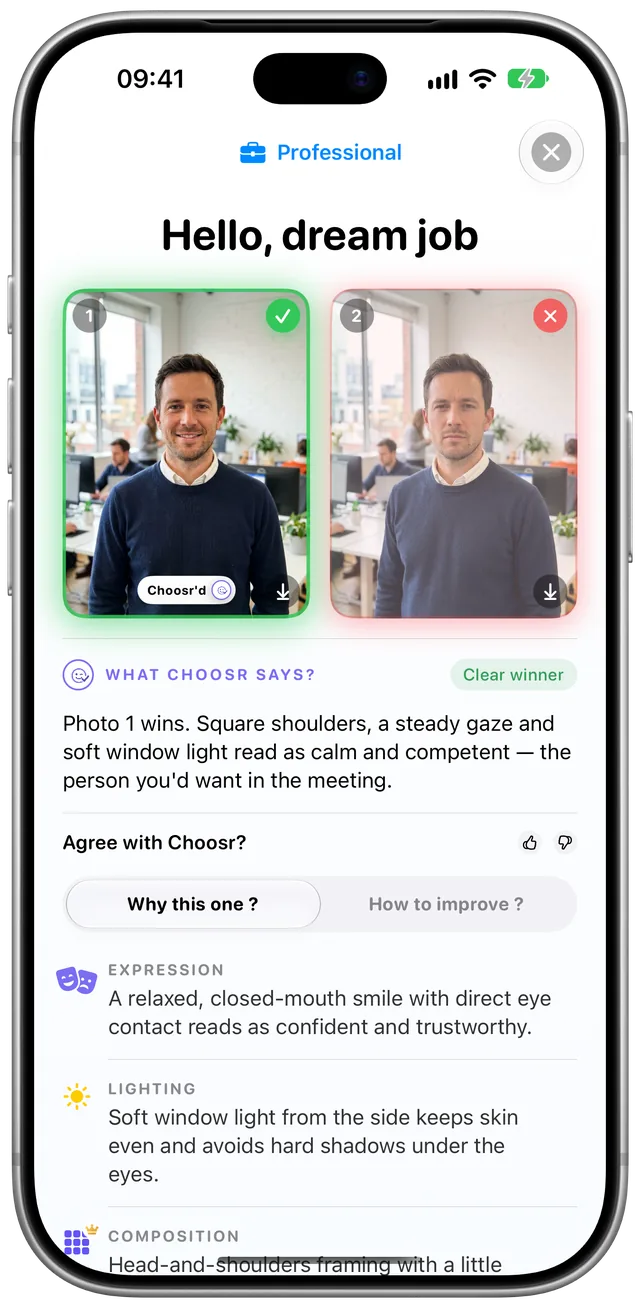
- Get a neutral second opinion. Choosr compares two photos for a professional profile and tells you which to use, with the specific reasons. With Bulk, it picks the best from three to ten shots of the same session.
Quick checklist
- Relaxed, confident expression, looking at the lens
- Soft, even light on your whole face
- Chest-up framing, camera at eye level, face fills the circle
- Sharp focus on the eyes
- Plain or softly blurred background
- Solid colors, dressed for your field
- Recent, solo, no filters
Let Choosr pick your headshot
Pick two photos, choose Professional, and get the winner with the reasons behind it. Your first comparison is free, no account needed.

More guides: How to choose your best dating profile photo
LinkedIn and Instagram are trademarks of their respective owners. Choosr is not affiliated with or endorsed by them.