
Your first photo is usually the whole first impression. Someone glances at it for a second or two, and that glance decides whether they read your bio at all. So it is worth choosing it on purpose instead of grabbing the most recent selfie.
The good news: the photos that work share a handful of qualities you can check for yourself. This guide walks through them, then covers which photo to put first, the mistakes worth skipping, and what to do when you're down to two shots and can't tell which one is better.
What makes a dating photo work
1. A real, relaxed expression
A warm, genuine smile beats a posed one, and both beat a blank stare. The difference is usually in the eyes: a real smile reaches them. If you tend to freeze up for the camera, have a friend talk to you while they shoot, and pick the frame right after you laughed.
2. Eye contact
Looking into the lens reads as open and confident. It makes the photo feel like a moment between you and the person looking at it. Save the gazing-into-the-distance shots for later in the lineup; your first photo should look at the viewer.
3. Soft, flattering light
Light does more for a photo than any filter. Soft, even light, like a window during the day or outdoors in the hour before sunset, smooths skin and brings out the eyes. Harsh overhead light and direct midday sun do the opposite: deep shadows under the eyes, squinting, shiny skin. Face toward the light source rather than away from it.
4. A slight angle
Straight-on, passport-style photos tend to look flat. Turning your body a little away from the camera and your face back toward it adds shape and looks more natural. Hold the camera at eye level or just above; shots from below are rarely kind.
5. A clean background and warm colors
The background should help, not compete. An unmade bed, a cluttered desk or a crowd of strangers pulls attention away from you. A simple wall, greenery or a street with some depth works better. Warm, natural colors feel friendlier than cold, grey or heavily filtered tones.
Which photo to put first
Your lineup tells a small story, and the order matters. A simple structure that works on every app:
- First: a clear solo shot of your face. Head and shoulders, smiling, looking at the camera, good light. Nobody should have to guess which person you are.
- A full-length photo. Shows you as you are now, in clothes you actually wear.
- Something you love doing. Cooking, climbing, playing music, walking the dog. These give people an easy opener.
- A social photo. One with friends shows you have a life, as long as it is easy to tell which one is you.
- Something with personality. A trip, a pet, a funny moment. Variety beats five versions of the same selfie.
On Hinge, each photo can carry a caption or sit next to a prompt, so a photo with a story behind it pulls double duty. On Tinder and Bumble, the first photo carries more weight because it is often all someone sees before they swipe.
Common mistakes to skip
- Sunglasses or a hat in the first photo. They hide the parts of your face people most want to see.
- A group photo first. If someone has to work out which person you are, they often don't bother.
- Heavy filters and face-smoothing. They tend to look obvious, and they set up a mismatch when you meet in person.
- Old photos. Use photos from the last year or so. Honest beats flattering-but-outdated.
- Bathroom mirror selfies. Bad light, a phone covering your face and a toilet in the background is a hard combination to recover from.
- Someone cropped out. A stray arm on your shoulder raises more questions than it answers.
- Blurry or low-resolution shots. If it looks soft on your own screen, it looks worse on theirs.
Stuck between two photos?
This is where most people get stuck. You have two shots from the same afternoon, they look almost the same, and you have been flipping between them for ten minutes. A few ways to break the tie:
- Run the checklist. Go through expression, eye contact, light, angle and background for each one. The photo that wins on more of them usually wins overall.
- Look at them small. Shrink both to thumbnail size, the way they appear in an app. Details you were agonizing over disappear, and the one with the clearer face stands out.
- Ask someone who doesn't know you well. Close friends see the person they know, not the photo. A first impression from someone further away is closer to what a match sees.
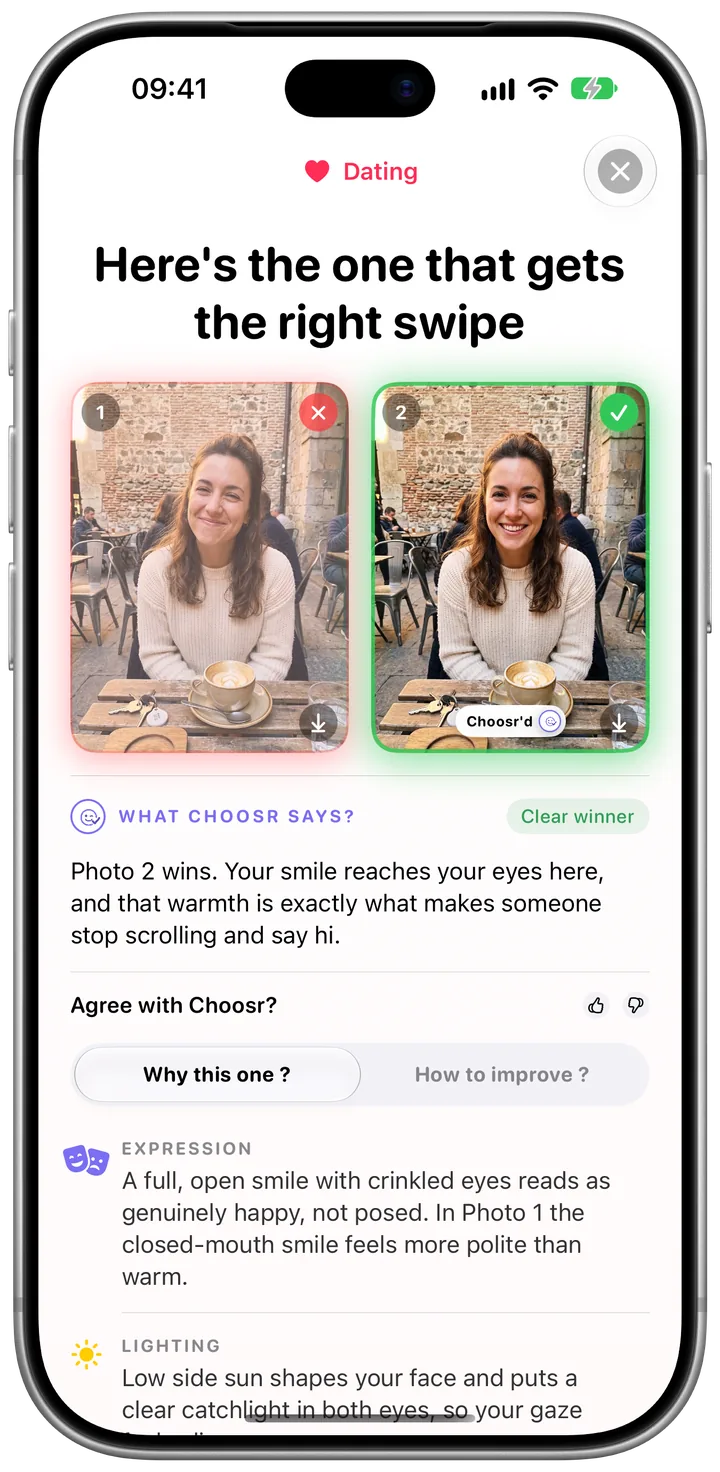
- Get a neutral second opinion. Choosr compares two photos for a dating profile and tells you which one to use, plus the specific reasons it won. With Bulk, it can pick the best from three to ten shots of the same moment.
Quick checklist
- Genuine smile that reaches the eyes
- Looking at the camera in your first photo
- Soft, natural light on your face
- Slight angle, camera at eye level
- Simple background, warm natural colors
- Solo, no sunglasses, taken in the last year
- A mix: face, full-length, hobby, friends, personality
Let Choosr pick the one to post
Pick two photos, choose Dating, and get the winner with the reasons behind it. Your first comparison is free, no account needed.

More guides: How to choose the best LinkedIn profile picture
Tinder, Hinge and Bumble are trademarks of their respective owners. Choosr is not affiliated with or endorsed by them.